
Evonex Connect User Guide
the Evonex Connect User Guide has been updated to cover Android and all the new features recently released. You can download the user guide here.
Please find below release notes and details of features, enhancements and fixes made to the Evonex platform and Evonex Connect over the last few months.
Highlights:
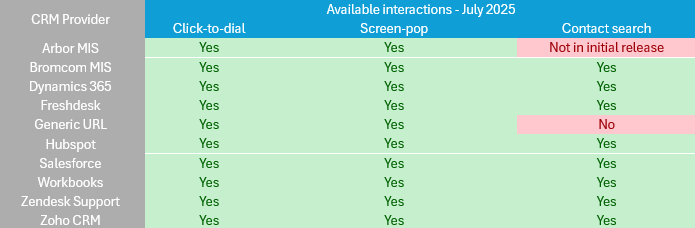
Support for seven new CRM integrations to complement the existing three in Evonex Connect
Insights release
Security Alerts now work for Evonex Connect mobile devices
Evonex Connect
New Features
| Change |
| New CRM integrations now available in Evonex Connect! We’ve added Bromcom, Dynamics 365, Freshdesk, Generic URL, Salesforce, Workbooks, Zendesk and Zoho. The full list of CRMs and their supported interactions is here Setup & User Guides are attached. |
| Description |
Portal

Insights
- Add Ring Time column to the Missed Calls Report.
- A report can no longer be saved as a favourite if custom date/time period filters are applied
- Fix an issue where huntgroup calls could show a negative value for on the Inbound Call Handling Report
- Fix an issue where the date was in US format if exporting the Itemised Calls report to CSV.
- Fix an issue where some calls would not be shown in the Call Activity By DDI Report.
- Fix an issue where sorting a report by ‘Date’ would not sort correctly.
Platform
New Features
Universal licences can now support Video handsets
Ensure security alerts work with the mobile client

Bug Fixes
Fix some issues with Anonymous calls not being logged correctly in call history. Affected portal & insights
Fix inbound international calls not displaying correctly in some scenarios
Fix unable to park a cross-account call that has been routed via an auto attendant
Fix BLF key stuck red after an unpark
Correct presence event for IVR disconnect
Full details of the changes to wallboards are available in the document. Please note, only the customer admin version is intended for distribution to end customers.
New Ordering Process – Help
The new ordering process has been live since September 2023. It’s no-longer a beta product and consequently has been promoted to the only way to place orders for new and existing customers.
For anyone who requires assistance with using the new order journey, you can access the help section by clicking the button at the top right of the portal page. In here you’ll find a video guide